Wednesday, October 21, 2026
Smart TV Updates Stop. Does a $29 Stick Fix It?
- Published
- 1:32 PM
- Author
- Comments
- 0
It's a weeknight, the couch is warm, and the streaming app you open every evening greets you with a message instead of a menu: this version is no longer supported on your device. Nothing is wrong with the picture. What ran out was the software, because smart TV updates were never promised for as long as the glass lasts.
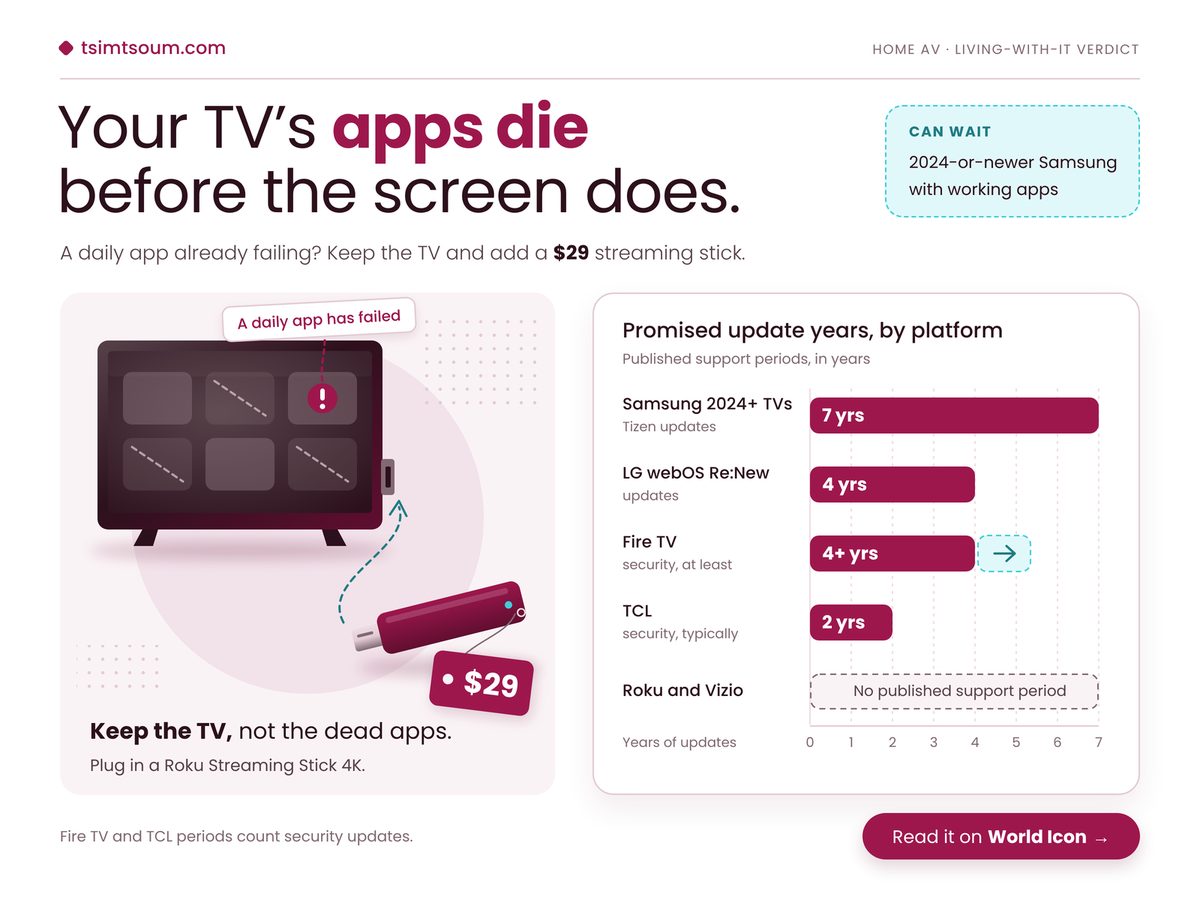
So do you replace a TV that still looks great, or plug a small stick into a spare HDMI port and carry on?
Key Takeaways
A streaming stick fixes failing apps on an out-of-support TV for far less than a new set, but a 2024-or-newer Samsung rarely needs one yet.
- LG, Fire TV and TCL sets run out of promised software years before their panels wear out.
- Roku and Vizio write down no end date, so plan as if support could stop at any time.
- Before buying Amazon's cheapest stick, check that your daily apps run on its new system.
What happens when smart TV updates stop?
The TV keeps working on its last software version, but app makers slowly stop supporting older platforms and security patches end, so the streaming apps you open every night fail long before the picture does.
That is the part the spec sheet never shows. Developers build for current versions, so a set that stops updating eventually meets an app update it cannot install.
LG's webOS Re:New programme guarantees four years of webOS updates for models from 2022 onwards, so an LG bought this year stops getting new versions while its panel is still young. Amazon commits to at least four years of security updates for Fire TV, and Insignia sets running Fire OS inherit that floor, so swapping a Fire TV set for a Fire TV stick buys no extra years on paper.
Further down, the promises thin out. TCL says it typically provides security updates for at least two years after a model first ships, on a policy page that does not even name TVs, so a budget TCL is the set most likely to need help first. Sony publishes end dates model by model. Roku and Vizio publish no support period at all, and Roku gives no end-of-life dates for its streaming boxes either. Our view, and only a view: silence is not proof of short support, but nobody can plan around a date never written down. The panel side is covered in what an OLED burn-in warranty actually covers.
Two sources sit behind the cards below: Engadget's October 2026 survey of manufacturer support pages, by Matt Tate, and Tom's Guide's December 2025 streaming stick review.
Samsung's Tizen Promise
7 years
Apps stay current most of its life
Roku Streaming Stick 4K
$29
Fresh apps without a new TV
Brands Promising No Fixed Term
4 brands
Check model pages before buying
Samsung vs TCL Promise
3.5x
Derived: pick brand before screen size
The ratio is the one to sit with. Two sets of similar size and price can differ more in app life than in anything printed on the box, which is backwards from how most people shop. Picture tweaks such as why Filmmaker Mode looks too dark get the showroom attention; software years get none, which is, admittedly, the least glamorous reason anyone has ever chosen a TV.
A TV warranty covers the glass. Nobody's warranty covers the apps, and the apps are the part you touch every single night.
Which fix fits the TV you already own?
The right move depends on two facts you can check in a minute, the brand and the model year, and the table below maps each common combination of the two to a single next step.
Do this sum first. Find the model year in your TV's settings, usually under About or Support, add the years your brand promises, and subtract that total from the year you expect to replace the set. Anything above zero is your gap number, the years you'd spend with no promised updates. Then find your row.
| If your TV is | Do this | Because |
|---|---|---|
| Samsung 2024+ | Keep the built-in apps | Tizen updates expected to at least 2031 |
| LG 2022+ | Add a stick around year five | New features land a year late |
| Sony 2025 | Look up your model's end date | One 2025 OLED ends April 2029 |
| TCL, Roku, Vizio | Budget for a stick by year three | No fixed term in writing |
| Any other set | Wait until a daily app fails | A working TV needs no fix yet |
Notice what the table never says: replace the TV. A set past its support window still shows the picture it showed on day one.
Keep a TV ten years and an LG, Fire TV or TCL set spends more than half of it without promised updates, so plan on a stick; a 2024-or-newer Samsung mostly will not need one. Derived by subtracting each brand's stated minimum support from a ten-year ownership span, using Engadget's October 2026 survey.
Where a streaming stick falls short
A stick replaces the apps, not the television: picture modes, input switching, voice settings and the TV's own security patches still belong to the set, and the cheapest new stick brings young software of its own.
That last point is the one buyers miss. Amazon's Fire TV Stick 4K Select launched at $39 in October 2025 on Vega OS, a new Linux-based system, and Tom's Guide found no sideloading, some cloud-hosted apps and only 1GB of RAM. The cheapest fix swaps an ageing system for an unfinished one, so check your apps exist for it before you pay.
A good streamer can still outlast any TV brand's promise. Apple's 2015 Apple TV HD runs tvOS 26, yet Apple listed it obsolete on 31 March 2026, ending Apple repairs and parts, TechRadar reported. On a stick, software can stay current for over a decade while the hardware becomes unrepairable.
A stick also lengthens your audio chain. If voices drift out of step with lips, our guide to which device should wait when soundbar audio lags has the fix, and what dialogue enhancement can and cannot fix still applies because sound passes through the TV. Before you plug in:
- The TV's own browser and built-in apps stay unpatched, so stop using them once you switch.
- You may juggle two remotes unless HDMI-CEC lets the stick's remote wake the TV and set volume.
- Use the wall adapter in the box, since a TV's USB port may not supply enough power.
Buy a stick this week if two of these are true
- An app you open daily shows an "unsupported device" or "update required" message.
- Your gap number from the sum above is more than zero.
- Your brand's support page lists no end date for your model.
- Your TV has a free HDMI port within reach of a wall socket.
Keep the TV, not the dead apps. If your gap number is above zero or an app has already failed, buy a Roku Streaming Stick 4K this week and move your daily apps onto it, skipping Amazon's Vega stick until your apps are confirmed there. A 2024-or-newer Samsung with working apps can wait. The panel was never the problem.
No comments
Post a Comment