Sunday, October 25, 2026

TV Electricity Cost: Picture Mode vs Standby

Published
Author
Comments
0

The TV is dark, the remote is on the sofa arm, and a small light still glows under the screen. Nobody is watching, yet the set is drawing power. That is the quiet half of your TV electricity cost; the louder half is the picture mode you chose on set-up night. Which is bigger? Two settings decide it.
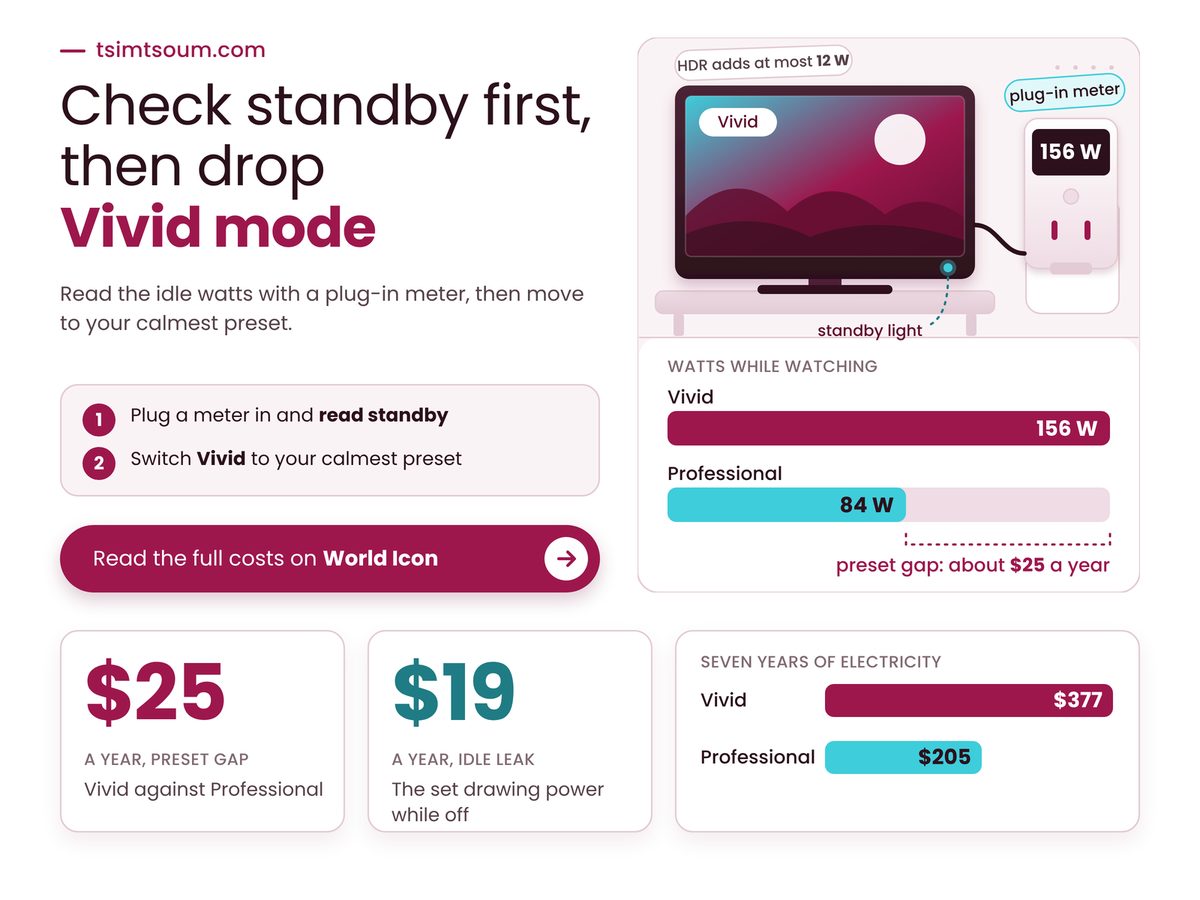
TV electricity cost chart: Vivid mode 156 W against Professional 84 W

Picture mode and standby each move what a TV costs to run by roughly $20 a year.

  • On one 65-inch OLED, the brightest preset drew 156 W against 84 W for the calmest, about $25 a year apart.
  • HDR is not the driver: it added at most 12 W on that set, about $4 a year even if every hour were HDR.
  • Standby is the check to make: an average non-qualifying set adds about $19 a year, a certified one under $1.

What sets your TV electricity cost each year?

Three numbers set it: the watts your picture mode draws while the screen is lit, the hours you watch, and the standby watts drawn the rest of the day, all priced at your local kWh rate.

Start with the clock. NEEA's April 2026 review (report E26-515) assumes a US set is on 5.2 hours a day and on standby the rest, so even a thin standby draw runs most of the day. Then price: the EIA's October 2026 outlook puts the 2025 US residential average at 17.30 cents per kWh and forecasts 18.21 for 2026. The sum underneath is watts times hours divided by 1,000, times your rate.

The preset is the second lever. In August 2025 What Hi-Fi? put an energy meter on a 65-inch Sony A95L OLED and logged 84 W in Professional, 108 in Cinema, 114 in Standard and 156 in Vivid, all in SDR. It treats Professional as roughly Sony's Filmmaker Mode, the setting our post on fixing a Filmmaker Mode picture that looks too dark covers. One set and one unnamed meter: treat the ratios as a guide. If yours is an OLED, what a five-year OLED burn-in warranty covers is the other long-horizon question.

Four derived numbers frame the decision, built on NEEA's averages (87 W for ENERGY STAR-qualifying 49 to 59 inch sets, 106.9 W for non-qualifying ones), the What Hi-Fi? readings and an 18-cent price.

Standby Time Each Year

6,862 hours

Derived: about 286 days of it

Vivid Over Professional

$24.60 a year

Derived, one OLED, 18 cents

Standby Energy At Market Average

108 kWh

Derived from NEEA's market average

ENERGY STAR On-Mode Saving

19% less

Derived from NEEA's 49 to 59 inch averages

Standby deserves the closer look because it is the only cost you pay while nothing is on. A set kept awake for a voice command or a cast request stays above its certified level, and ENERGY STAR's own criteria draw that line.

"

Most of a TV's day is standby, so a leaky idle setting can outweigh the gap between neighbouring picture modes.

Does HDR make a TV use more power?

Sometimes, and by little: on the Sony measured, HDR drew 12 W more than SDR in Professional mode, 18 W less in Standard, 12 W less in Cinema and the same 156 W in Vivid.

What Hi-Fi? assumed HDR is 8% of viewing, about 110 of 1,369 hours a year, and admits it is a judgment: Ofcom publishes no split. Even all-HDR viewing in Professional would add roughly $4.10 a year at 18 cents (12 W × 5.2 h × 365 ÷ 1,000 = 22.8 kWh), and in Vivid HDR changed nothing. Switching HDR off to save power targets the smallest lever on the page.

Which TV picture mode uses the least energy?

On the one 65-inch OLED measured, the calmest preset, Professional, used the least and Vivid the most, and the grid below prices each draw at three electricity rates so you can find your own row.

Find your preset's draw on the left, then read across at your price per kWh. Cells are dollars a year at 5.2 hours a day and a certified 0.5 W standby; Pro is Sony's Professional mode.

Watts12¢18¢30¢
Pro 84 W$20$29$49
Cinema 108 W$25$38$63
Standard 114 W$26$40$66
Vivid 156 W$36$54$90

The shaded cell, Standard at 18 cents, reads $40 a year. One column right adds $26, one row down adds $14, and one row up saves only $2: the real jump is from the calm presets to Vivid.

Worked example: a 65-inch set in Standard mode at 114 W, on 5.2 hours a day, 0.5 W standby for the other 18.8 hours, at 18 cents per kWh (the EIA forecast, rounded). On-mode: 114 W × 5.2 h = 592.8 Wh a day. Standby: 0.5 W × 18.8 h = 9.4 Wh. Together 602.2 Wh, times 365, is 219.8 kWh a year: $39.56 a year, $276.95 over seven years.

What does your TV cost to run?Set your preset's watts, your daily hours, the standby draw and your kWh price. The figures update as you move them.
Your numbers
On-mode cost a year$38.95
Standby cost a year$0.62
Total a year$39.56
Total over your years$276.95
You would pay $39.56 a year and $276.95 over your years. The preset gap matters less than a leaky standby.Sliders need JavaScript. Figures shown are the article's example.Rate from the EIA Short-Term Energy Outlook, October 2026 (18.21 cents for 2026); 5.2 hours a day from NEEA E26-515 (April 2026); 114 W is What Hi-Fi? Standard mode, SDR.

Year 1 Vivid $54 Professional $29 gap +$25 Year 3 Vivid $162 Professional $88 gap +$74 Year 5 Vivid $270 Professional $147 gap +$123 Year 7 Vivid $377 Professional $205 gap +$172

This shows how fast the gap between a calm preset and Vivid builds, so you can judge whether the menu trip pays. Derived from the 84 W and 156 W readings at 5.2 hours, 0.5 W standby and 18 cents.

Does a TV use power when it is turned off?

Yes, a plugged-in TV that looks off still draws standby power, from about half a watt on a certified set to 15.72 W on the market average NEEA reports for non-qualifying sets.

NEEA's Table 4 gives 0.48 W for ENERGY STAR-qualifying sets (California Energy Commission test data). The 15.72 W is an observed market average from an unstated sample size: a warning about the category, not a promise about your set. At 18 cents, that spread is roughly $19 a year, against under a dollar for the certified level.

Our call: Vivid is not an obvious mistake in a sunlit room, or at least not one to sneer at; glare is a real reason to want brightness. Before paying for it nightly, read whether a matte screen is worth the trade.

  • Read the label as a ceiling. The ENERGY STAR criteria page we could open (energystar.gov) carries a 30 October 2015 effective date and lists 0.5 W idle and 3 W where an outside signal can wake the set; NEEA cites current v9.1 at 1 W.
  • Treat 114 W as a middle. NEEA's fleet average on-mode draw is 124 W as reported, 116 W as calculated, across sizes.
  • Measure, then decide. A plug-in energy meter shows watts with the screen dark and again lit.

Key Takeaways to act on: check these on your own set

  • Your set wakes for a voice command or a cast request while it looks off.
  • Your bill shows more than 25 cents per kWh, about 40% above the calculator's default.
  • The preset sits on its brightest setting because of a bright room, not taste.

The decision this week is where to spend ten minutes: standby or picture mode. Plug a meter in behind the TV and read the watts with the screen dark. Above 3 W, hunt the standby setting first; near half a watt, move off Vivid to your calmest preset and stop there. Then put your own wattage and kWh rate into the calculator above.

How we checked this

We read NEEA report E26-515 (26 April 2026), What Hi-Fi?'s Filmmaker Mode energy test (22 August 2025), the EIA Short-Term Energy Outlook (October 2026) and ENERGY STAR televisions criteria page. The worked example assumes a 114 W set, 5.2 hours a day, a 0.5 W standby and 18 cents per kWh. No product was tested hands-on for this article, and the wattages are What Hi-Fi?'s, from one OLED and a meter it does not name. Last verified: 25 October 2026. Edited by Ragu, reviewed after publication. Spotted something out of date? Tell us and we will correct it.
Wednesday, October 21, 2026

Smart TV Updates Stop. Does a $29 Stick Fix It?

Published
Author
Comments
0

It's a weeknight, the couch is warm, and the streaming app you open every evening greets you with a message instead of a menu: this version is no longer supported on your device. Nothing is wrong with the picture. What ran out was the software, because smart TV updates were never promised for as long as the glass lasts.

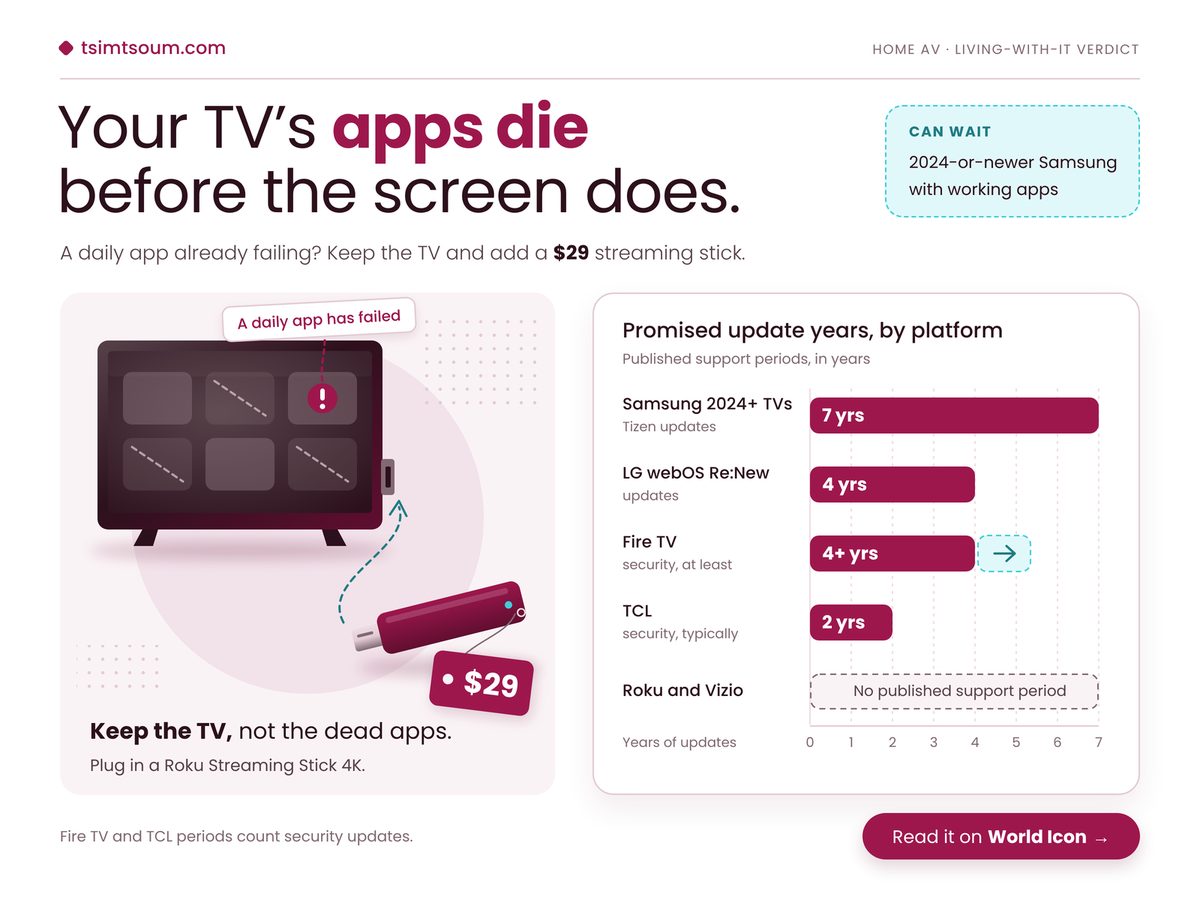
Smart TV updates chart by platform beside a TV and $29 streaming stick

So do you replace a TV that still looks great, or plug a small stick into a spare HDMI port and carry on?

Key Takeaways

A streaming stick fixes failing apps on an out-of-support TV for far less than a new set, but a 2024-or-newer Samsung rarely needs one yet.

  • LG, Fire TV and TCL sets run out of promised software years before their panels wear out.
  • Roku and Vizio write down no end date, so plan as if support could stop at any time.
  • Before buying Amazon's cheapest stick, check that your daily apps run on its new system.

What happens when smart TV updates stop?

The TV keeps working on its last software version, but app makers slowly stop supporting older platforms and security patches end, so the streaming apps you open every night fail long before the picture does.

That is the part the spec sheet never shows. Developers build for current versions, so a set that stops updating eventually meets an app update it cannot install.

LG's webOS Re:New programme guarantees four years of webOS updates for models from 2022 onwards, so an LG bought this year stops getting new versions while its panel is still young. Amazon commits to at least four years of security updates for Fire TV, and Insignia sets running Fire OS inherit that floor, so swapping a Fire TV set for a Fire TV stick buys no extra years on paper.

Further down, the promises thin out. TCL says it typically provides security updates for at least two years after a model first ships, on a policy page that does not even name TVs, so a budget TCL is the set most likely to need help first. Sony publishes end dates model by model. Roku and Vizio publish no support period at all, and Roku gives no end-of-life dates for its streaming boxes either. Our view, and only a view: silence is not proof of short support, but nobody can plan around a date never written down. The panel side is covered in what an OLED burn-in warranty actually covers.

Two sources sit behind the cards below: Engadget's October 2026 survey of manufacturer support pages, by Matt Tate, and Tom's Guide's December 2025 streaming stick review.

Samsung's Tizen Promise

7 years

Apps stay current most of its life

Roku Streaming Stick 4K

$29

Fresh apps without a new TV

Brands Promising No Fixed Term

4 brands

Check model pages before buying

Samsung vs TCL Promise

3.5x

Derived: pick brand before screen size

The ratio is the one to sit with. Two sets of similar size and price can differ more in app life than in anything printed on the box, which is backwards from how most people shop. Picture tweaks such as why Filmmaker Mode looks too dark get the showroom attention; software years get none, which is, admittedly, the least glamorous reason anyone has ever chosen a TV.

"

A TV warranty covers the glass. Nobody's warranty covers the apps, and the apps are the part you touch every single night.

Which fix fits the TV you already own?

The right move depends on two facts you can check in a minute, the brand and the model year, and the table below maps each common combination of the two to a single next step.

Do this sum first. Find the model year in your TV's settings, usually under About or Support, add the years your brand promises, and subtract that total from the year you expect to replace the set. Anything above zero is your gap number, the years you'd spend with no promised updates. Then find your row.

If your TV is Do this Because
Samsung 2024+ Keep the built-in apps Tizen updates expected to at least 2031
LG 2022+ Add a stick around year five New features land a year late
Sony 2025 Look up your model's end date One 2025 OLED ends April 2029
TCL, Roku, Vizio Budget for a stick by year three No fixed term in writing
Any other set Wait until a daily app fails A working TV needs no fix yet

Notice what the table never says: replace the TV. A set past its support window still shows the picture it showed on day one.

Samsung 2024+ 3 yrs on your own LG 2022+ 6 yrs on your own Fire TV, Insignia 6 yrs on your own TCL 8 yrs on your own

Keep a TV ten years and an LG, Fire TV or TCL set spends more than half of it without promised updates, so plan on a stick; a 2024-or-newer Samsung mostly will not need one. Derived by subtracting each brand's stated minimum support from a ten-year ownership span, using Engadget's October 2026 survey.

Where a streaming stick falls short

A stick replaces the apps, not the television: picture modes, input switching, voice settings and the TV's own security patches still belong to the set, and the cheapest new stick brings young software of its own.

That last point is the one buyers miss. Amazon's Fire TV Stick 4K Select launched at $39 in October 2025 on Vega OS, a new Linux-based system, and Tom's Guide found no sideloading, some cloud-hosted apps and only 1GB of RAM. The cheapest fix swaps an ageing system for an unfinished one, so check your apps exist for it before you pay.

A good streamer can still outlast any TV brand's promise. Apple's 2015 Apple TV HD runs tvOS 26, yet Apple listed it obsolete on 31 March 2026, ending Apple repairs and parts, TechRadar reported. On a stick, software can stay current for over a decade while the hardware becomes unrepairable.

A stick also lengthens your audio chain. If voices drift out of step with lips, our guide to which device should wait when soundbar audio lags has the fix, and what dialogue enhancement can and cannot fix still applies because sound passes through the TV. Before you plug in:

  • The TV's own browser and built-in apps stay unpatched, so stop using them once you switch.
  • You may juggle two remotes unless HDMI-CEC lets the stick's remote wake the TV and set volume.
  • Use the wall adapter in the box, since a TV's USB port may not supply enough power.

Buy a stick this week if two of these are true

  • An app you open daily shows an "unsupported device" or "update required" message.
  • Your gap number from the sum above is more than zero.
  • Your brand's support page lists no end date for your model.
  • Your TV has a free HDMI port within reach of a wall socket.

Keep the TV, not the dead apps. If your gap number is above zero or an app has already failed, buy a Roku Streaming Stick 4K this week and move your daily apps onto it, skipping Amazon's Vega stick until your apps are confirmed there. A 2024-or-newer Samsung with working apps can wait. The panel was never the problem.

Friday, October 16, 2026

OLED Burn-In Warranty: Does Five Years Cover It?

Published
Author
Comments
0

The evening news is on again, and the channel logo sits in the same corner it sat in last night. A few weeks into life with an OLED, most owners start wondering what that little badge is doing to the screen, and whether the OLED burn-in warranty would pay up if the answer turns out to be something permanent. LG, for one, advertises five years. Whether those five years mean what you hope is a different question.

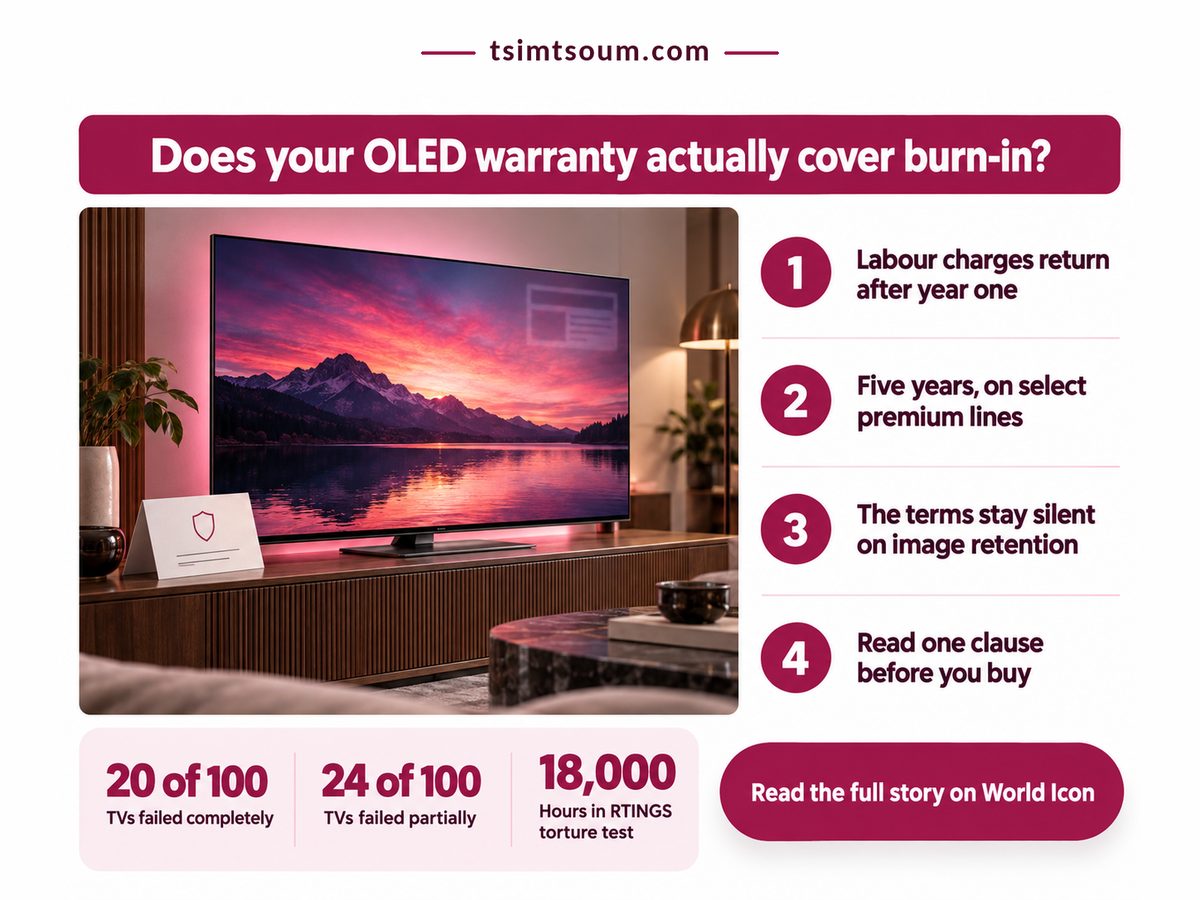
OLED burn-in warranty poster: a TV with a ghost mark beside a warranty card

Key takeaways: five years sounds like burn-in cover, but the LG page behind it never mentions burn-in, so read the clause, not the number.

  • Under mixed viewing, long tests found burn-in unlikely on 2022-or-later OLEDs; the real risk is one static logo for days.
  • Labour is free in year one only, and the five years applies to named premium lines.
  • LCD is no safer: edge-lit sets rated least reliable in the same study.
  • Ask for the burn-in wording for your model and country in writing.

What does an OLED burn-in warranty actually promise?

On LG's Canadian OLED warranty page, the promise is five years of protection for the panel on named premium lines, yet the page never mentions burn-in or image retention, so coverage cannot be assumed.

That page (as read in October 2026) says the panel is protected for five years. A footnote names the G5, G6 and W6 lines. So the five years is a promise about the panel, or more exactly the panel on a handful of named lines, not a birthright of every LG OLED. Check the model number on the box before the headline does your thinking for you.

  • Year one: everything is covered, labour included.
  • Years two to five: panel and parts only, with labour charges applying.
  • All of it sits under applicable terms and conditions, which the headline does not quote.

The page is Canadian: terms differ by country, and LG's terms in the US, UK or India, along with other brands' terms, were not verified for this piece.

None of this makes burn-in imaginary. RTINGS, in a note last modified in August 2026, says burn-in resistance has not clearly improved under extreme static use, even though newer OLEDs are much brighter. HiFi Editorial, reporting RTINGS on 16 August 2026, describes a 10,000-hour test on a continuous news feed at maximum SDR (standard dynamic range) brightness, where a 2017 LG C7 and 2020 to 2023 models showed similar burn-in rates. I would hedge that second report, because it is secondhand and the rates are not shown.

The reading that survives both is practical: a bright, unmoving logo is the habit to manage, so brightness is the lever you hold. Our piece on why Filmmaker Mode can look too dark covers the settings, and TV glare and whether a matte screen is worth it weighs the glare that tempts people to push brightness back up.

Four numbers settle most of the worry, three from TechRadar's December 2025 report on RTINGS' long-term test of TVs bought in 2022, all run at maximum brightness (failure count as of November 2025). Every OLED there developed burn-in only in the single-static-logo torture test; under mixed usage it was not really an issue. The fourth is the warranty page's labour split.

Hours in the torture test

18,000 hours

A decade of heavy viewing

Years labour can be billed

4 of 5 years

Technician time becomes your bill

TVs in the long-term test

100+ TVs

A sample, not anecdotes

TVs that failed, fully or partly

44 of 100

Edge-lit LCDs fared worst

Test hours are not household hours. They describe the harshest evening anyone could build, far outside a home with varied viewing. The ordinary risk is a screen parked on one channel for days, not a Friday night of films.

"

The test pushed screens harder than any living room will. The warranty page, meanwhile, never says the word burn-in.

How does the five-year cover break down?

Year one is the generous year, with everything covered, while years two to five narrow to panel and parts, with labour charged, and nothing on the page states a burn-in rule either way. Now my own arithmetic, not a source's: five years at five hours of TV a day is about 9,125 hours, roughly half the hours the long test applied. Under mixed viewing most of the test's hours are far gentler, so a burnt panel inside the warranty is the unlikely case and an ordinary fault, where the labour clause bites, the likelier one.

Category Detail What it means
💰 First year 1 year: everything, labour too ✅ No repair labour bill in year one
🧾 Later years Years 2 to 5: panel and parts only ⚠️ A repair can still bring a labour bill
⏱ Panel length 5 years, panel only ✅ A long window for a panel fault
🔋 Models covered 3 premium lines named ⚠️ Other lines are unconfirmed; check yours
🌍 Country Canadian page; terms vary ⚠️ Your own country's page is what counts
⚖️ Burn-in clause Not mentioned on the page ❌ Cover cannot be assumed

Read down the middle column and the pattern is plain: the generous part is year one, and the vague part is the clause you care about.

100 TVs in the long-term test, as of Nov 2025. 20 of 100. 24 of 100. 56 of 100. Failed fully. Failed partly. Neither failed.

Choosing another panel type to dodge burn-in does not buy a trouble-free TV, because roughly four in ten sets of every kind failed fully or partly in the long test. Source: RTINGS' long-term test as reported by TechRadar; the 56 is the derived remainder.

Where does the five-year promise break?

It breaks at the fine print, not the calendar: coverage is subject to terms and conditions, and burn-in cover stays unconfirmed for every brand until you read the terms for your country and model.

Opinion: I read the silence as a warning, not an invitation. LG may well treat burn-in as a covered panel defect in practice, but nobody outside the company can tell that from the page, and I would not spend money on the hope.

Set-up is where owners decide their own risk, and it often shares an afternoon with the soundbar, a separate fight laid out in soundbar audio delay and which device should wait.

  • Country: a Canadian page is not your contract.
  • Brands: Samsung and Sony burn-in terms were not verified here.
  • Plans: ask whether any extended warranty names image retention.

Conditions to check before you count on cover

  • Your model number matches a line your country's LG page lists for five-year panel cover.
  • Your country's terms say, in plain words, whether burn-in or image retention is covered.
  • Your evenings are mixed, with films, shows and sport, not one static channel for days.
  • You are ready to pay for a technician's visit after year one.

This week, find your TV's exact model number and read your own country's warranty page for it, searching the terms for burn-in and image retention. The decision: buy the OLED you want and keep static logos in check, but pay nothing extra for burn-in cover until someone puts it in writing.

Related: how many years of smart TV updates each brand promises

Friday, October 9, 2026

Soundbar Audio Delay: Which Device Should Wait?

Published
Author
Comments
0

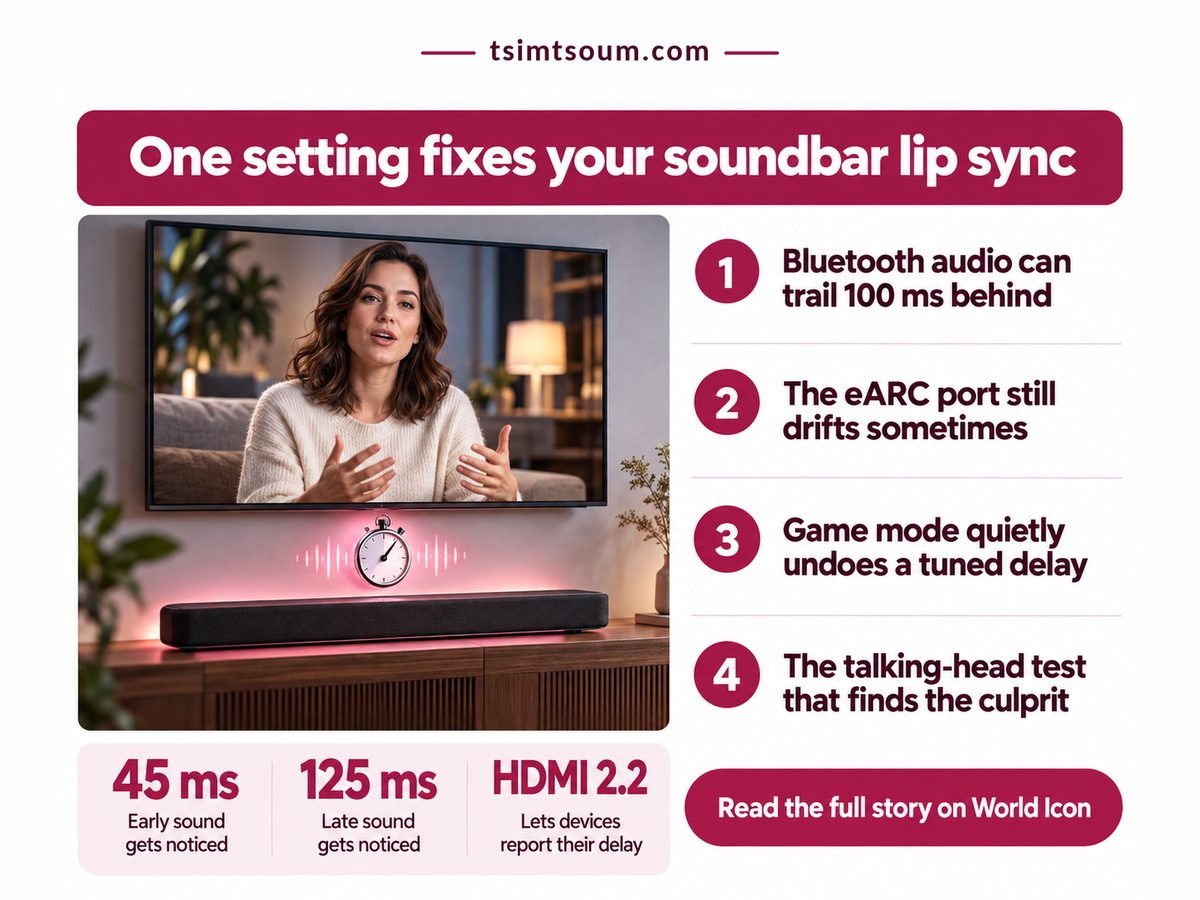
A newsreader's lips close on a hard "p", and the sound lands a beat later. Or a beat earlier, which is worse. You open the menus and find two sliders, one on the TV and one on the soundbar, and a question nobody answers on the box: which device should wait? Soundbar audio delay is rarely a fault. It is two machines disagreeing about time, and the fix depends on which one is running ahead.

Infographic on soundbar audio delay with a TV, slim soundbar and stopwatch

Key Takeaways

The signal that runs ahead waits: delay the sound once when voices come early, and cut processing when they come late.

  • Viewers spot early sound far sooner than late sound, so never push audio ahead to compensate.
  • Use one delay control, ideally the soundbar's, and leave the other at zero.
  • Bluetooth and compressed optical links run late before you touch anything; a wire or PCM output fixes more than a slider.
  • HDMI 2.2's new sync protocol is a reason to check your next TV's spec sheet, not to replace a working bar.

Why does soundbar audio delay happen at all?

Voices drift because the picture and the sound take different routes, and every box on the sound route, from the TV's audio output to the soundbar's decoder, adds its own processing time. The picture is not innocent either. Motion smoothing and upscaling hold the image back while the sound leaves early, so a quick bar under a heavily processed picture puts voices ahead of lips. A slow bar puts them behind. Same symptom, opposite fixes. Even picture modes move it: the Filmmaker Mode settings we looked at recently strip most of that processing, and sync shifts with them.

Direction matters more than size. ITU-R BT.1359, the broadcast recommendation from 1998 that is still in force, found viewers detect sound arriving 45 ms early but only notice late sound at 125 ms. A bar running slightly late can pass unnoticed for years; one running slightly early looks wrong from the first sentence. Thunder follows lightning, never the reverse. This is the most useful number in home AV, and almost nobody quotes it.

Four numbers settle most living-room cases. RTINGS, in a January 2024 study built on 500 latency measurements, found a soundbar's ARC or eARC link often syncs worse than plugging the source into the bar, and that one sound-effects setting added 30 ms. Its headphone test puts typical Bluetooth SBC latency at 150 to 250 ms (as of 2023). Voice modes are processing too, worth knowing if you lean on the dialogue enhancement modes on TVs and soundbars.

Typical Bluetooth SBC Lag

150-250 ms

Late before any setting

RTINGS Latency Measurements

500

ARC drift is common

Cost of Most Fixes

$0

A menu, not a cable

Late vs Early Tolerance

2.8x

Err late, never early

The Bluetooth figure rules options out. A standard SBC link is past the late limit before you open a menu, and a delay slider can only make the early signal wait; it cannot pull late sound forward. The tolerance ratio is our own division of the ITU thresholds.

"

Your eyes forgive late sound almost three times longer than early sound. Every sync decision follows from that.

Should you set the delay on the TV or the soundbar?

Set it on one device only, preferably the soundbar because it sits last before your ears and sees every input, and use the TV's AV sync setting only when the bar has no delay control of its own. Two stacked delays is the classic mistake. Broadcasters may already hand you a signal out of step, so the table starts with the slack you inherit; its headroom rows are our arithmetic from ITU-R BT.1359 and the EBU's R37.

Category Detail What it means
⚖️ Broadcast slack EBU R37: up to 40 ms early or 60 ms late ⚠️ Part of the error arrives pre-made
⏱ Early headroom About 5 ms if a show arrives early ❌ Any audio advance gets seen
⏱ Late headroom About 65 ms for every box at home ✅ A small lag passes unnoticed
🔋 ARC vs HDMI-In LG S95QR: 65 ms on ARC, near 0 ms on HDMI-In ✅ Plugging the source into the bar helps
🔋 Optical, Dolby RTINGS: lag on the order of 300 ms when compressed ❌ Switch the TV output to PCM first
🔋 Bluetooth bar Standard SBC alone exceeds the late limit ❌ No slider can rescue this link
🏁 Who waits Early voices: the sound waits
Late voices: cut processing
🏁 Delay once; never push sound ahead

Read the ARC row against the late-headroom row. That single measured hop, if it runs late, spends the whole home margin by itself. RTINGS found bars closer to perfect sync with the source in the soundbar's HDMI input, so a cable move can beat a settings hunt.

170 ms. window. Early side: 26%. Late side: 74%.

If you are unsure which way to nudge the delay, leave the sound slightly late, because nearly three quarters of the noticeable sync window sits on the late side. Derived from the ITU-R BT.1359 detection thresholds quoted above, summed into one window and split by direction.

Does eARC fix lip sync, and where does it still break?

eARC can carry automatic lip-sync data, a feature HDMI first added in version 1.3, but it only works when both devices report their delays honestly, and plenty of chains still drift on particular apps and picture modes.

The real fix is newer. The HDMI Licensing Administrator released HDMI 2.2 in June 2025 with a Latency Indication Protocol, aimed at chains with a soundbar or receiver in the middle, so each device can report its delay. Both ends need it. Exact figures are still being studied, but early indicators suggest it reaches new TVs and bars long before the ones on your wall, so check for it on your next purchase rather than retiring a bar that works.

Picture modes are the other trap. Game mode strips video processing, which makes the picture faster and leaves the sound relatively late, so a delay tuned in Movie mode drifts when a console wakes the TV. The same goes for separate day and night presets, the sort people set up to fight glare in a bright living room: check sync in each one.

  • Drift in one streaming app only: leave the global delay alone.
  • Optical with Dolby: PCM output cuts decoding time but drops surround formats.
  • Both sliders set: zero one of them before judging the other.

Before you touch a slider, check these against your own setup

  • Sound arrives before the lips close, on every input: delay it once on the bar.
  • Sound trails the lips and the bar uses Bluetooth or optical: change the link.
  • Drift on one console only: fix it at that source.
  • Your TV and bar both carry an HDMI 2.2 logo: let them sort it out first.

So, which device should wait? Whichever signal is ahead: one delay on the soundbar for early voices, less processing for late ones. This week, put on a newsreader, zero both sliders and watch lips close on a "p": delay early sound in small steps until it stops bothering you, and give late sound a different cable instead.

Tuesday, October 6, 2026

Filmmaker Mode Too Dark? Two Settings to Move

Published
Author
Comments
0

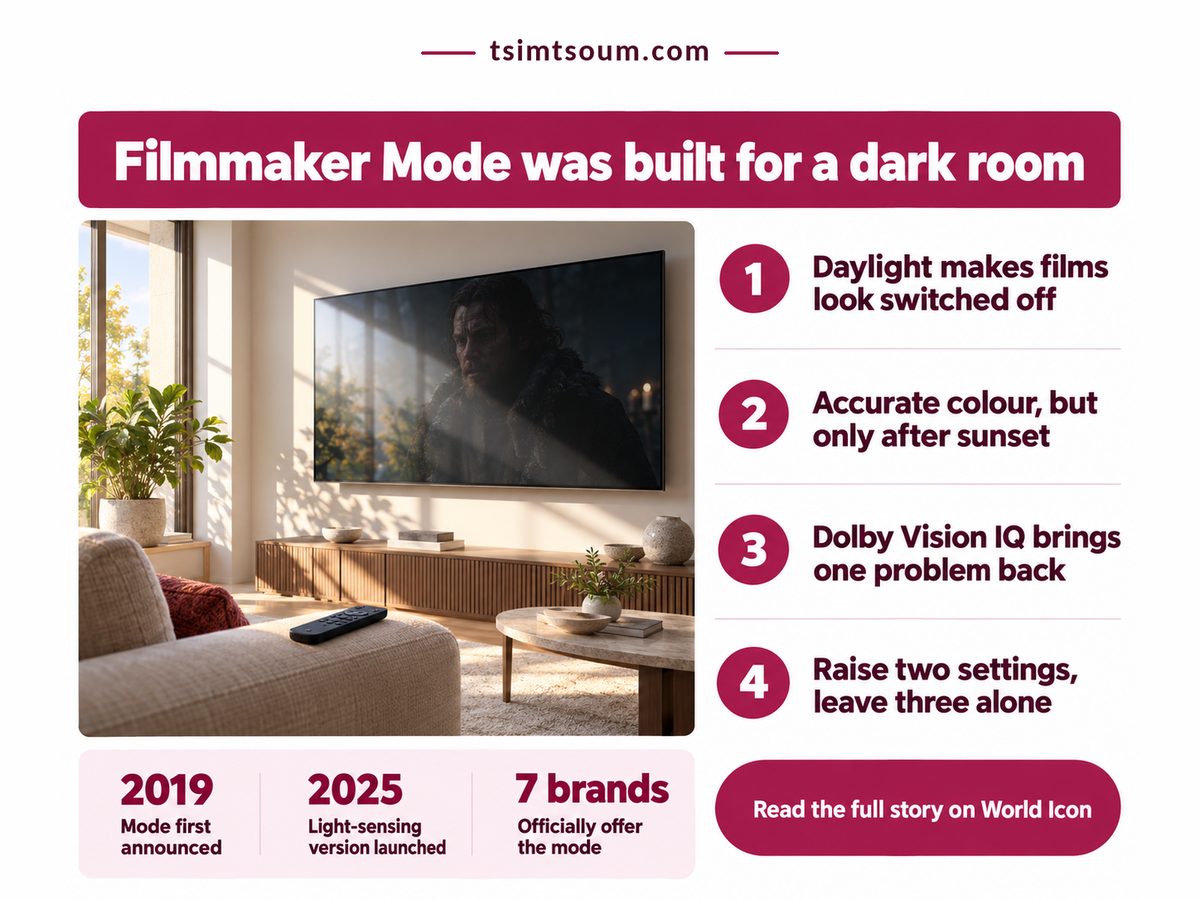
Saturday, early afternoon, sun pouring through the window behind the sofa. You put on a film you have waited weeks to see, switch the TV to Filmmaker Mode because every review said to, and the opening scene is a murky smear where a candlelit room should be. Is the panel faulty? It isn't. The phrase people type from the sofa is nearly always filmmaker mode too dark, and the answer starts with the room the mode was built for, which is not yours at two in the afternoon.

Infographic on filmmaker mode too dark, with a TV in a sunlit living room

Key Takeaways: Filmmaker Mode is dark by design, tuned for a lamps-off room, and two changes fix daytime viewing.

  • Raise panel light (OLED Pixel Brightness or Backlight) first, then lighten gamma one step.
  • Leave motion smoothing, sharpening and white point where the mode puts them.
  • Never raise the black-level control: it turns black bars grey.
  • Undo both after dark, when the stock picture is already correct.

Why is Filmmaker Mode so dark?

Filmmaker Mode is dark because it copies the picture a colorist saw in a dim grading suite, so its brightness and gamma assume a room with almost no light, not a living room at midday.

A UHD Alliance white paper on ambient light compensation, published in October 2025, puts the grading suite's surroundings at 5 candelas per square meter, about the glow of a lamps-off evening, and says compensation should do nothing in a room that dim. Read that as permission: at night the stock mode is already right. The paper also says a fix should leave black level alone and lift only what sits above it, through gamma.

Reviewers hit the same wall. Writing for TechRadar in October 2025, one tester said many films in the mode look "so dark that I might as well have the screen turned off" on a bright day. So nothing needs repairing or returning. The standard advice to always watch in Filmmaker Mode assumed a darkened room, and it has aged badly in homes with big windows.

Four numbers frame the decision, from the mode's timeline, the partner list at FilmmakerMode.com (retrieved October 6, 2026) and the effort a manual fix takes.

Wait for a daylight fix

6 years

Older sets go manual

Cost of the manual fix

$0

No calibrator, no new TV

Brands offering the mode

7 brands

Sony owners use Custom

Menu changes per day

4 changes

If you reset each night

The wait is this article's own arithmetic. Until a version could read the room, every set shipped tuned for darkness, so the manual route is the default answer, not a workaround. If sun lands on the screen itself, that is reflection, and whether a matte TV screen is worth the trade is the better read. Sound has the same problem, covered in what TV and soundbar voice modes can and cannot fix.

"

Nothing in the panel is broken. The picture is right for a lamps-off room; at two in the afternoon, the room is what's wrong.

Should I use Filmmaker Mode during the day?

Yes, use Filmmaker Mode during the day, but move two settings first: raise the panel's light output and lighten gamma one step, then leave everything else the mode sets exactly where it is.

Panel light comes first: OLED Pixel Brightness on recent LG models, Backlight on most LCD TVs. Push it up until the darkest scene you care about reads from your seat. Gamma comes second, and one step lighter lifts faces while black stays black. The trap is the slider beside it: on several brands, LG among them, Brightness actually sets black level, and raising it greys every letterbox bar.

Which route suits you depends on one fact about your TV.

Filmmaker Mode too dark: fix it by hand or by sensor?

Fix it by hand if your TV was sold before late 2025, because only the newest sets carry the light-sensing version that adjusts Filmmaker Mode for room brightness on its own, and nothing about the manual route costs money.

TechRadar reported in October 2025 that Filmmaker Mode 1.1 adds ambient light compensation through the TV's light sensor while keeping color accurate, and that LG's C5 and G5 OLEDs already ship with it. For those owners, one toggle replaces both manual changes.

Dimension Manual vs Sensor What it means for you
💰 Cost to try Manual Free, works today
Sensor Free, late-2025 sets only
✅ No spend; your TV's age decides
📊 Mid-tone lift Manual Gamma 2.4 to 2.2
Sensor Rises with room light
✅ Faces and shadows readable by day
⏱ Daily effort Manual Undo it at dusk
Sensor None once switched on
⚠️ Easy if you watch at one time of day
⚖️ Black level Manual Safe unless you touch it
Sensor Built to leave it alone
❌ Grey bars mean the wrong slider moved
🌍 Availability Manual Every set with the mode
Sensor A handful of models
⚠️ Most owners only have the manual route
🏁 Best suited for Manual Pre-2025 sets, bright rooms
Sensor Newest sets, shifting light
🏁 Let your TV's model year decide

The manual route costs a little daily effort; the sensor route costs a newer TV. And if you watch almost only after dark, neither applies.

2019. 2024. Jan 2025. Oct 2025. Mode announced. LG among first. Dolby Vision. LG, Philips. TCL range. Dolby version. Version 1.1. Senses light. Only the last stop reads your room·

If your TV went on sale before the October 2025 update, plan on the two manual changes rather than waiting for a sensor to fix daylight dimness for you. Dates come from What Hi-Fi's 2019 launch report and TechRadar's January and October 2025 coverage.

Is Dolby Vision IQ better than Filmmaker Mode in a bright room?

Not usually: Dolby Vision IQ does read room light, but it switches motion smoothing back on by default and can still look drab, so it trades one daytime problem for another.

TechRadar's January 2025 Dolby Vision coverage found the standard Dark and IQ modes apply motion smoothing out of the box. Switch to IQ for brightness and your film starts to look like a daytime soap, so check the motion menu after any mode change.

Some sets offer a better middle path. The same report says Dolby Vision Filmmaker Mode reached LG's 2024 OLED range and Philips' OLED809 in 2024, then TCL's 2025 range, so Dolby Vision titles keep the accurate picture and the same two changes apply inside it. A brighter panel also draws more power, worth knowing if time-of-day tariffs price your peak hours.

  • A Vivid or IQ preset brings motion smoothing back.
  • Raising black level turns shadows grey.
  • Daytime settings left on at night over-brighten a correct picture.
  • Sets without the mode need a Custom preset built the same way.

Check these about your own setup first

  • Daylight reaches the screen when you actually watch.
  • Filmmaker Mode's menu has no light-sensor toggle.
  • You know which slider your TV calls Brightness.
  • You have a film you know well enough to judge.

This week, pick the sunniest hour you really watch in, play a film you know, and change only panel light and gamma. Grey black bars mean you moved the wrong control.

Related: what an OLED burn-in warranty actually covers

Related: what each picture mode adds to your TV electricity cost